5
min read
Oct 27, 2026
Moving Strapi Media to S3 When Staging and Production Share Files

Most Strapi projects start with one environment and media on the default storage. Then a staging server appears, someone copies content across, and file URLs start pointing at the wrong place without anyone noticing. Later you decide to move the media library to Amazon S3 behind a Content Delivery Network (CDN). That's when you find out that strapi transfer times out on large libraries and that IDs change between runs.
We hit all of these at once on a recent Strapi 5 project. A sync plugin from an earlier phase of development had linked staging and production so closely that each one served part of the other's media. The live mobile app was temporarily running on staging, so we couldn't switch anything off without breaking what users saw.
Below is the order we followed to separate the two environments, move every file to S3, and make production the primary environment again, with no downtime. The scripts and checks work on any Strapi project with the same symptoms.
Assets on staging pointed at production, assets on production pointed at staging, and hundreds on both sides pointed at nothing at all. The task sounded simple: fix production, using staging. But staging was now serving real users, and a third of its media lived on production's storage.
The usual fix is to wipe the broken environment and restore it from the healthy one. Here, neither side was healthy.
Staging had 3,588 asset records that expanded to 9,608 stored objects, about 907 MB. Grouped by host, 6,523 sat on staging's own storage and 3,085 on production's. If you wipe production, a third of the live app's images and audio disappear mid-session. If you restore production from staging, you copy the dependency along with the content.
That loop decided the order of everything else. Staging had to stop depending on production first. It wasn't the priority, but until staging stood on its own, we had nothing reliable to rebuild production from.
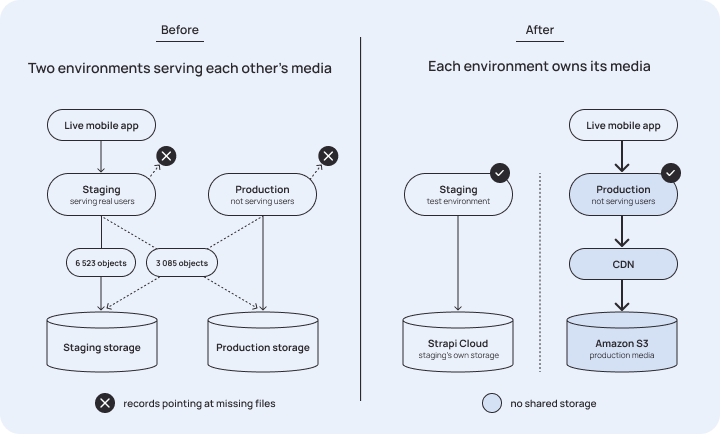
Before we changed anything, we counted every stored object and grouped it by host. That includes originals and image variants, because formats carries its own URLs. You can run the same check on your project to see whether your environments are linked:
If the result has more than one key, your environments are linked. We ran this check before and after every step that followed, so “did that work?” became a diff instead of an opinion.
We built the rest of the tooling the same way. The scripts read through the content API instead of the database, so the same script runs against a local copy, staging, or production, and one environment variable switches between them. You don't need shell access, which matters on managed hosting.
Staging served 819 assets in active use from production's storage. Each one needed its own copy on staging's storage without touching the content that referenced it, and there were 18,045 of those references.
Uploading them as new files and relinking every reference by hand wasn't realistic. Strapi's upload endpoint has a replace mode that avoids the problem:
The ?id= parameter does the work. It swaps the file on an existing record and keeps its hash and ext. The file keeps its ID, every relation stays as it was, and the entry doesn't switch to Modified in the admin panel. Only the host in the URL changes.
Before running that 819 times, we had to test one assumption: does replacing a staging file that points at production delete production's copy? The upload provider only deletes from its own storage, so it shouldn't. With a live app on the other end, “shouldn't” wasn't enough. We replaced a single asset and checked that production still had its copy before touching the second one.
After that we moved to batches of five, then 10, then a full dry run, then the rest. The closing count showed one host.
Broken assets were a separate problem, and we handled them with the same care. The sync plugin had left behind records pointing at files that never arrived.
Deleting a broken asset that nothing uses is easy. Deleting one that live content still references is not, and a script shouldn't guess. We produced a list, the content team relinked what mattered by hand, and only then did we run the deletions. They ran in batches, dry run first, and the script checked the usage count right before each delete instead of trusting an earlier scan.
Strapi Cloud doesn't expose a Command Line Interface (CLI). You can't open a shell or run a script against the running instance, and the URL rewrite we needed touches every row in the media table. So we ran the migration on a machine we controlled:
aws s3 sync asset-migration/files/ s3://$AWS_BUCKET/ --size-only is direct, resumable, and fast, because the files never pass through a websocket.files.url, every entry in files.formats[*].url, and provider and provider_metadata at the CDN host. Do a dry run first and log the before and after for every row. A mistake on your local copy costs nothing, while the same mistake on production causes an outage.Production's rows arrive already pointing at S3, and the files are already there. Content and files meet at the CDN, and neither passes through the CMS.
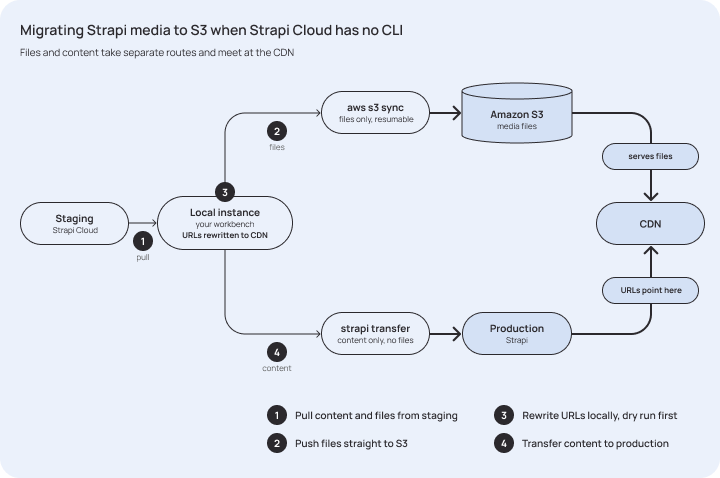
Leaving the files out of the transfer is the only option that makes sense here, since they already reached S3 by a faster route.
Leaving the files out also avoids the problem that had cost us hours. A transfer that includes assets runs deleteAllAssets first. It deletes every existing file one at a time through the upload provider, originals and every image variant, in sequence. Meanwhile the CLI gives the destination five retries, 30 seconds apart, to acknowledge the first message. That's about 3.5 minutes for an operation that needs much longer, so you get Request timed out while the destination is still working fine.
When you exclude files, Strapi skips that whole phase:
One more trap showed up here, and it had already cost us a run. Transfers don't keep primary keys. Strapi recreates and remaps entities, so the same file was ID 5745, then 16509, then 20097 across attempts. Any script that caches IDs between runs ends up targeting the wrong rows. We rebuilt every script to look up records by hash and recheck each one before writing to it.
We kept staging on Strapi Cloud storage on purpose.
A tidier setup is one S3 bucket with staging/ and production/ prefixes. It works, because Strapi applies rootPath inside the key computation, so deletes stay separate. But staging is seeded from production and carries the same content hashes, which means the same object keys. With prefixes, production's safety depends on one config value staying correct in the environment you use for experiments. Separate storage removes that risk instead of managing it.
Then came the handover. The client tested a TestFlight build against the rebuilt production, validated it with the real app, and only then moved live traffic back.
Production is the primary environment again and serves media from S3 through a CDN. Staging is a test environment again. It holds its own copies and shares no storage with production, so nothing you do in one can reach the other. The app stayed up the whole time.
Nothing here needed a clever trick. What mattered was the order: find the dependency, pick the one sequence that doesn't break anything live, measure before and after every step, and test risky assumptions on one record before running them on 819. When Strapi Cloud wouldn't let us run the migration where the data lived, we moved the work to a local copy. The scripts are still in use for regular media library health checks.
Inherited a Strapi project where something doesn't add up? As a headless CMS agency and Strapi Enterprise Partner, we run Strapi audits that map how your environments, media, and integrations connect before anyone changes anything. Book a Strapi audit.
A transfer that includes assets first runs deleteAllAssets, which deletes every existing file one by one through the upload provider, including all image variants. The CLI only waits a few minutes for the destination to acknowledge the first message, so on a large media library you get "Request timed out" while the destination is still working. Excluding files from the transfer skips that phase.
List every file URL, including the URLs in each file's formats, and group them by host. If you get more than one host, your environments are linked.
Yes. Send the upload request with ?id= and the existing file's ID. Strapi swaps the file on that record, keeps its hash and extension, and every relation stays as it was.
Pull the project down to a local instance, sync the files straight to S3 with aws s3 sync, rewrite the media URLs locally to point at your CDN, and transfer the content to production without files.
No. Strapi recreates and remaps entities on every transfer, so the same file can get a different ID each time. Scripts should look up records by hash, not by cached IDs.
It works with separate prefixes, but staging seeded from production carries the same file hashes and object keys. Production's safety then depends on one config value staying correct in staging. Separate storage removes that risk.

Get our updates delivered directly in LinkedIn. No extra inbox, just your feed.



We’ll find out what your team needs, together. Book on Calendly.
Send us a message or schedule a call.
Discuss your needs in a 25 min free call.
Get a quote from us within 3 days.
You can also e-mail us at sales@notum.cz or book a meeting directly in our calendar.